


MP3 Cutter and Ringtone Maker
4.77.23K Reviews
App Specs
- Version
- 2.3.5.1
- Updated On
- License
- Free
- Downloads
- 50,000,000+
- Developer
- InShot Inc.
- Categories
- Music & Audio
- Platform
- Android, iOS
Screenshots
 Analysis by AppCompare
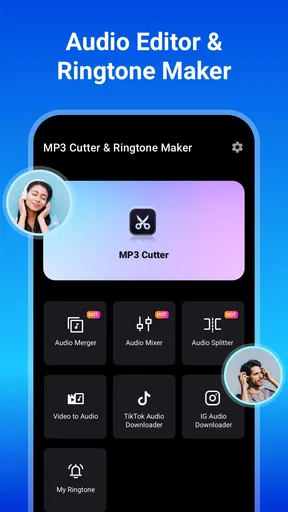
When I first opened MP3 Cutter and Ringtone Maker, I wanted to solve a small, familiar problem: make a phone sound feel like mine without learning a full audio-editing program. The app is a focused music and audio tool from InShot Inc., and its appeal is the short path from choosing a sound to trimming a usable clip. If you mainly want to shape audio for a ringtone, alarm, or notification, it gives you a simple place to start.
What to expect from a focused audio tool
This is not the sort of editor I would choose to produce a finished song or mix several tracks. Its strength is narrower and more practical: take audio you can access, pick a section, and prepare a shorter sound for everyday use. That focus makes the interface less daunting for a first-time editor, though it also means people looking for a broad set of studio controls may soon want another app.
The app is free to install, with optional in-app purchases priced from $3.99 to $15.49 per item. It is rated for Everyone, and its current version is 2.3.3. The 4.7 average across around 711,000 ratings and more than 50 million installs suggest that it has found a large audience, but popularity does not make every workflow effortless. I would approach it as a convenient utility, not a replacement for a dedicated audio workstation.
For someone who has never trimmed audio, the key reassurance is that the main job is easy to understand: choose a track, identify the useful portion, and listen before keeping the result. You do not need to know editing terminology to make a sensible first cut. I would still take a moment to check the finished clip on the phone, because a selection that looks right on a waveform can feel different when heard as an alert.
Getting Started with MP3 Cutter and Ringtone Maker
First things first, downloading the app was a breeze. It's available on both Android and iOS, and it took mere seconds to install. Once I opened it up, I was greeted by a clean and straightforward interface. No overwhelming menus or confusing options, just a simple layout that gets straight to the point.
Making the first cut without overthinking it
For a first attempt, I would choose a track with a clear moment I can recognize rather than trying to rescue a complicated recording. A chorus entrance, a short instrumental phrase, or a spoken cue is easier to locate than a long section with similar-sounding passages. I listen once to find the moment, set the beginning and end around it, then play the selection before saving. That final preview is worth the few seconds: it helps catch a cut that starts mid-word or ends before the sound has resolved.
One useful trade-off is clip length. A longer selection can preserve the musical phrase, but it may be excessive for a brief notification; a very short one can be efficient yet feel abrupt or hard to identify. I decide based on the job rather than trying to make every sound as short as possible. For a call ringtone, a recognizable phrase matters. For a message alert, a concise sound is usually more practical.
Worth Reading Before You Choose

Flipboard Shows What News Apps Must Do Beyond the Feed

Switching to Android Auto Means Rethinking Your Driving Routine

Google Calendar Makes a Crowded Week Easier to Manage

Ludo King Makes the Most of the Minutes Between Plans

Baby Panda World Brings Quick Play to Modern Phones, but Its Game Library Feels Busy

ESPN’s Live Game View Makes Following Close Games Easier
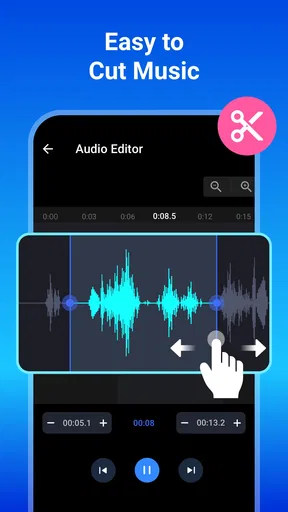
It also helps to make a deliberate cut instead of dragging the markers in a hurry. If the waveform is busy, zooming in gives a clearer view of where the sound changes, but listening remains the better check for whether the transition feels natural. I would avoid trimming right on a sharp transient unless that impact is the sound I actually want; leaving a little breathing room can make an alert less jarring.
Features You’ll Love
The MP3 Cutter and Ringtone Maker app offers a bunch of features that make it super easy to create custom ringtones. You can use any song from your library, or even record your own sounds. The cutting process is intuitive; just select the part of the track you want, and voila! You've got yourself a new ringtone.
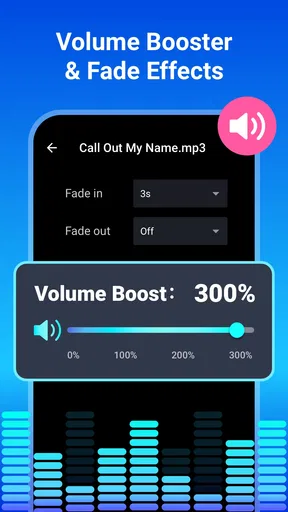
One feature I really liked is the ability to fade in and fade out the audio. This makes the ringtone sound more professional and less abrupt. Plus, you can adjust the volume, which is great if you're working with a track that’s a bit too loud or too soft.
Fades are particularly useful when the chosen segment begins or ends suddenly. I would use a light fade to soften an awkward edge, but not automatically apply one to every clip: a fade can also weaken the immediate punch that makes a notification easy to notice. The volume adjustment is similarly best used with care. It can make a quiet source more usable, but it is not a substitute for choosing a clean recording in the first place.
A realistic use for the recording option is a short personal cue: a family member saying a name, a distinctive sound from home, or a reminder recorded in your own voice. Before relying on a recording, I would listen for background noise and keep the intended phrase comfortably clear. That is a different kind of personalization from cutting a song, and it can be more useful when you need to recognize a particular alert quickly.
Using the Editor
The editing tool is pretty straightforward. You’re presented with a waveform of your chosen track, and you can easily zoom in to get precise cuts. There are markers to help you select the start and end points of your ringtone. Honestly, it’s like using a mini audio editing software, but way simpler!
I also appreciated the undo and redo buttons. We all make mistakes, and having the option to quickly fix them without starting over is a lifesaver.
The waveform is a visual guide, not a guarantee that a cut will sound smooth. A quiet passage may look almost flat while still containing the start of a word or note, so I would replay the beginning and end rather than trusting the shape alone. Undo and redo make it easier to experiment: I can move a marker, compare the result, and return to the previous choice if the new version sounds worse.
When editing a longer track, I find it useful to locate the target section first and only then refine the boundaries. Searching visually from the start can become tedious, especially when several sections have a similar rhythm. A recognizable lyric or change in instrumentation gives me a better landmark. This small workflow makes the editor feel less like guesswork, even though it remains intentionally simpler than a full multitrack program.
Choosing the right workflow for the job
Compared with the usual alternatives, this app sits between a built-in ringtone picker and a full audio editor. A phone’s standard sound settings are quicker when the existing tones are good enough, but they offer less control over selecting a particular moment from a personal audio file. A desktop editor or a more advanced mobile workstation is better for layering, detailed sound design, or repeated production work. I would use this app when the task is simply to make one clean, personal cut without turning it into a larger project.
It is also not the best choice when I need to repair a noisy recording, balance several sources, or add elaborate effects. The app’s simplicity is useful precisely because it avoids those deeper tasks, but that becomes a limitation once my goal expands. If a clip needs serious cleanup before it can work as a ringtone, I would edit it in a tool designed for sound processing first, then use a straightforward cutter only if I still need a final trim.
For a first-time user, another practical question is whether a song in the library can be selected. The app is designed around choosing audio available to it, but I would not assume that every track from every music service is an ordinary editable file. If a song is unavailable in the picker, trying a locally accessible audio file or making a recording of a sound you have the right to use is a more sensible next step than repeatedly searching the same protected source.
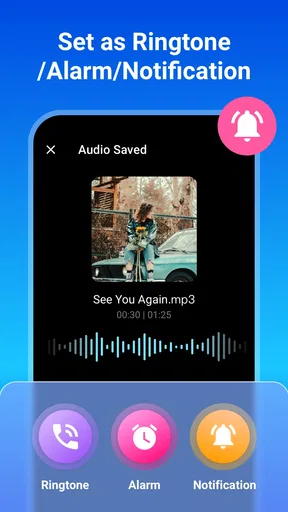
Once a clip is saved, I would check the phone’s sound settings and select it for the intended purpose if the system does not apply it automatically. Ringtone, alarm, and notification choices can be handled differently by a device, so the useful test is not only whether the audio was created but whether it plays where I expect. A short test call or alert, when convenient, catches surprises before I depend on the sound in daily life.
Why It Stands Out
One thing that sets this app apart is its ability to save your creations in different formats. Whether you need an MP3, WAV, or AAC file, this app has got you covered. It’s perfect for those who might want to use their creations beyond just ringtones.
Another cool aspect is the app’s lightweight nature. It doesn’t hog the resources of your phone, so you can create ringtones without worrying about your device slowing down.
Format choice can matter when a file is intended for use beyond a phone alert, but I would choose based on the device or app that needs to play it rather than assuming one format is always superior. If I only want a personal ringtone, the simplest compatible option is usually enough. If I plan to share or reuse the audio elsewhere, keeping track of which version I made avoids confusion later.
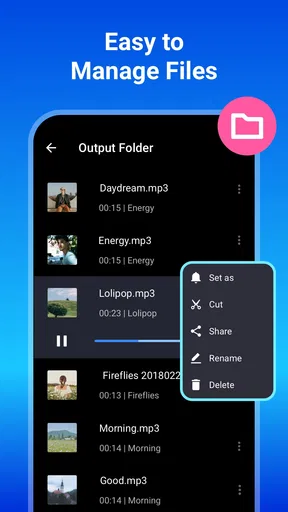
A small but worthwhile habit is to give finished clips names that describe their purpose rather than leaving a collection of vague versions. That is especially helpful if I create several alternatives while testing different start points. It turns a one-off edit into something I can find again without replaying every file, and it reduces the chance of choosing a rough draft as the active alert.
Room for Improvement
While the app is pretty solid, there are a couple of areas where it could improve. For instance, a few more editing features like effects or equalizers would be a nice addition. Also, while the app is mostly ad-free, an occasional pop-up can disrupt the flow. A premium, ad-free version could be an attractive option for many users.
The main limitation for me is that a simple trimming workflow cannot solve every audio problem. A track with a quiet lead-in, a sudden loud section, or an awkward transition may need more careful editing than a basic cutter is meant to provide. I can improve the result by choosing a cleaner segment and previewing it, but I would not expect this app to replace detailed mixing controls.
There can also be a little friction between making a file and making it the active sound on a phone. Saving a clip is only one part of the process; the device’s own sound controls determine where it is used. That is not a reason to avoid the app, but first-time users should allow time to confirm the setting rather than assuming the edit has changed every alert automatically.
In-app purchases are another consideration for anyone trying to keep phone utilities entirely free. The app costs nothing to install, but optional purchases are available. I would first test whether the basic editing flow meets my needs before spending anything. If I only need an occasional trim, the free starting point may be enough; if the purchase options matter to your decision, check what is offered in the app before committing.
This tool is best for people who want a quick, hands-on way to personalize a phone sound and are comfortable doing a little listening and adjusting. I would skip it if I rarely change alerts, prefer the convenience of built-in tones, or need professional audio controls. Those are not failures of the app; they are signs that a different level of tool—or no extra tool at all—fits better.
My Final Thoughts
All in all, MP3 Cutter and Ringtone Maker is a fantastic app for anyone looking to personalize their phone’s soundscape. It’s easy to use, efficient, and packed with enough features to keep most users satisfied. Whether you’re a tech newbie or a seasoned audio editor, this app makes creating ringtones a fun and straightforward task.
So, if you’re tired of those generic ringtones and want to add a personal touch to your phone, give this app a shot. I promise, you’ll have a blast crafting the perfect sound that suits your style!
My recommendation is strongest for the person who has one clear goal: turn a useful or memorable sound into a short clip and set it as an alert. Start with an easy-to-recognize section, preview the edges, make a modest adjustment if needed, and then test it in the phone setting where you plan to use it. That sequence keeps the first try reassuring and gives you a real result without asking you to become an audio editor.
For everyday use, I can imagine trimming a favorite musical phrase for calls, making a brief personal notification, or preparing a recorded reminder that stands apart from the phone’s usual sounds. If I wanted to build a polished track or fix a difficult recording, I would reach for a more capable editor instead. For straightforward customization, though, this is a practical little utility that gets the important part right: helping a personal sound feel deliberate rather than default.
Pros
- Intuitive interface for easy editing.
- Supports multiple audio formats.
- Fast processing with minimal lag.
- Allows precise clip selection.
- No watermark on exported files.
Cons
- Ads can be intrusive at times.
- Limited advanced editing features.
- Occasional crashes reported.
- No cloud sync for projects.
- Free version has limited tools.
FAQs for MP3 Cutter and Ringtone Maker
What features does the MP3 Cutter and Ringtone Maker offer?
The MP3 Cutter and Ringtone Maker app allows users to trim audio files to create personalized ringtones, alarms, and notifications. It supports various audio formats and provides a user-friendly interface for precise cutting. Additionally, it offers features like fade-in/out effects and volume adjustments to enhance the ringtone experience.
Is the MP3 Cutter and Ringtone Maker app free to use?
Yes, the MP3 Cutter and Ringtone Maker app is available for free download. However, it may include in-app purchases or ads to unlock premium features or remove advertisements. Users can enjoy the basic functionalities without any cost, making it accessible for anyone looking to customize their audio clips.
Which audio formats are supported by the app?
The MP3 Cutter and Ringtone Maker app supports a wide range of audio formats, including MP3, WAV, AAC, AMR, and more. This versatility ensures users can work with most audio files from various sources to create their ideal ringtones or audio clips without needing additional conversion software.
How easy is it to use the MP3 Cutter and Ringtone Maker?
The app is designed with a user-friendly interface that makes it simple to navigate and use, even for beginners. Users can easily select the audio file, set the start and end points for cutting, and apply effects with intuitive controls. The app also provides a preview feature to ensure satisfaction before saving.
Can I share the ringtones created with the app?
Yes, users can easily share the ringtones they create with the MP3 Cutter and Ringtone Maker app. Once a ringtone is saved, it can be shared directly via messaging apps, email, or social media. This makes it convenient to spread customized audio clips with friends and family effortlessly.


